Project Dashboard
shows up-to-date statistics about the current project. Project Managers or higher roles can view Project Dashboards.
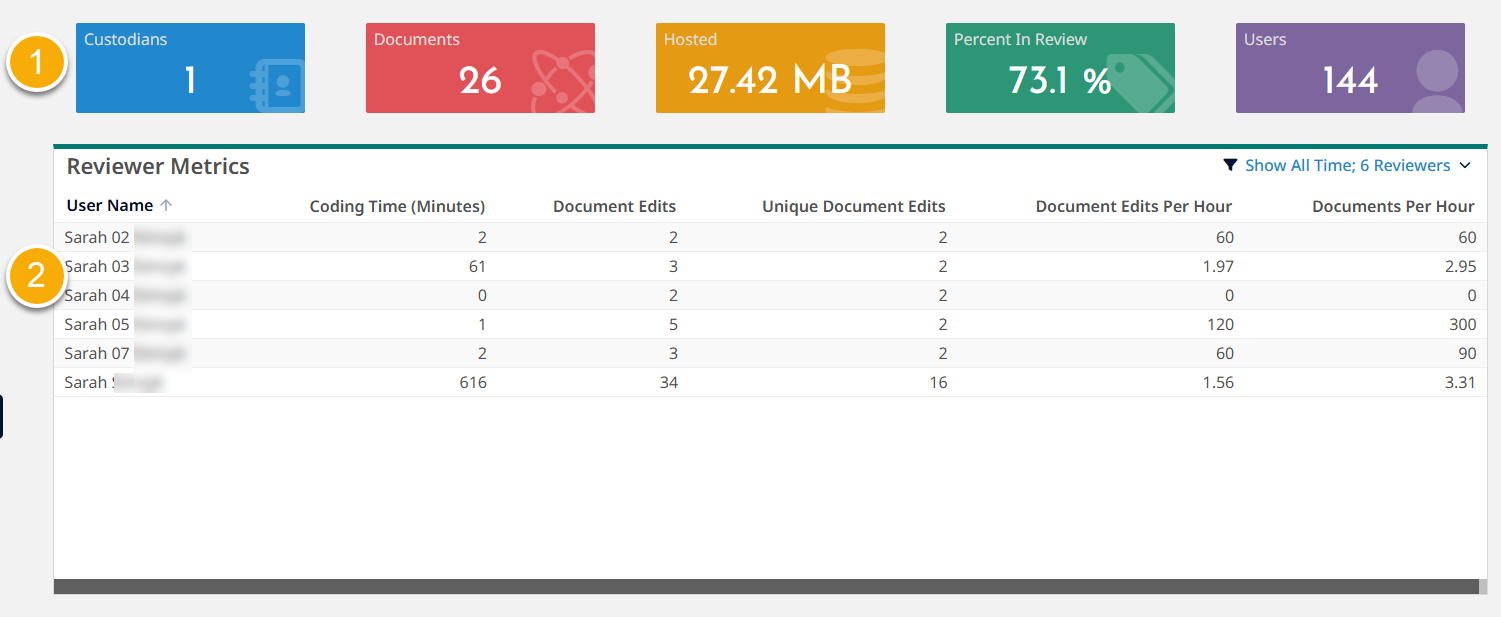
The dashboard shows Summary information and and tables.
- Summary information at the top of the page includes the following project-specific information.
- - total number of processed documents in the project. This number does not include deleted documents, which are immediately removed from this total.
Note that the displayed document count in the project might not align with the document count in Inspect if there are collected documents that have not been processed because Inspect only shows and counts processed documents. - - total number of active custodians in the project.
- - percent of promoted documents in the project. This number includes concealed documents but does not include deleted documents, which are immediately removed from this total.
Percentage Promoted = (total number of documents promoted / documents in the project) X 100. - - total hosted space, including documents in search index, database, and file hosting. This number includes loaded documents and concealed documents. This number does not represent peak hosting.
- - number of active users with access to the project. Active users include the Client Administrator, Project Manager, Litigation Support, Review Manager, Senior Reviewer, and Reviewer roles.
- - total number of processed documents in the project. This number does not include deleted documents, which are immediately removed from this total.
- provides insights into reviewer productivity and overall review speed.
- provides a summary of the documents managed by each custodian.
The following figure shows an example Project Dashboard.
The following list provides related topics.